NeoPixel Breakout Board Install Guide
Table of contents
Table of contents
Overview
The NeoPixel Breakout Board receives 8 PWM signal lines via RJ45 from the Node Card or PWM Card and powers up to eight 5 V NeoPixel-compatible LED strips (WS2812, SK6812). Voltage is regulated onboard from AC/DC/DCC input via the accessory power bus.
What’s Needed
| Component | Purpose | |
|---|---|---|
| NeoPixel Breakout Board | Distributes PWM signal and 5 V to each strip | |
| PWM Card | Generates PWM signals for NeoPixel control | |
| Network cable (CAT5/CAT6) | Connects PWM Card to Breakout Board (RJ45) | |
| 1–8 NeoPixel Strips (5 V) | LED output devices receiving signal and power | |
| 2-wire cable | Connects Accessory Power Bus to power input (J9) | (5 V type only) |
Connection Diagram
flowchart LR
  subgraph Train Layout
    direction LR
    node[[Node Card]]
    pwm[[PWM Card]]
    breakout[[NeoPixel <br>Breakout Board]]
    pwrbus("PWR BUS <br>(AC/DC/DCC)")
    pixel1["Pixel Strip 1"]
    pixel2-8["Pixel Strips 2...8"]
  end
  node -->|"Network Cable → J10"| breakout
  pwm -->|"Network Cable → J10"| breakout
  pwrbus -->|"2-wire Cable to J9"| breakout
  breakout --> |"3-wire → J1"| pixel1
  breakout --> |"3-wire → J2...J8"| pixel2-8
Connector Assignments
| Label | Pins | Function |
|---|---|---|
| J1–J8 | 3-pin | Pixel headers (SIG/5V/GND) |
| J9 | 2-pin | Power input (AC/DC/DCC) |
| J10 | RJ45 | PWM input from PWM Card |
Installation Steps
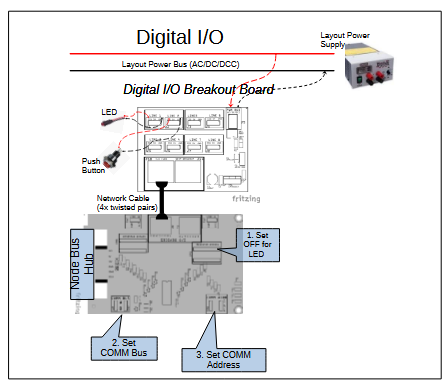 Set PWM Card selector for LINES 7/8 to PWM mode.
- Connect PWM Card to NeoPixel Breakout Board using RJ45 network cable.
- Connect PWR BUS (J9) to layout accessory power (AC, DC, or DCC).
- Connect 1 or more NeoPixel strips to J1–J8 headers (SIG/5V/GND).
- Note: Pixel signal lines are protected with 1kΩ resistors. Shared 5 V rail protected by SMAJ5.0A TVS + JK30 3A resettable fuse.
- Ensure PWM Card Line 8 is not set to 12 V if connected
- Pixel signal lines are protected with 1kΩ resistors
- Shared 5 V rail protected by SMAJ5.0A TVS + JK30 3A fuse
Status Indicators
- LED1 ON = 5 V output active (power OK)
Testing & Troubleshooting
- Cables & Connections
- Ensure the network cable between the PWM Card and NeoPixel Breakout Board is fully seated and oriented correctly.
- Verify accessory bus voltage and polarity at the board’s power connector.
- Confirm device wiring matches the board pinouts (signal, VDC+, GND).
- Firmware & Diagnostics
- Use the LCC Configuration Monitor (JMRI), serial console, or other diagnostic tool to check that inputs register and outputs toggle as expected.
🧰 Troubleshooting Flow
| Test | Check Point | Expected |
|---|---|---|
| Power LED | LED beside VR1 | LED is ON |
| PWR BUS Voltage | J9 VDC+ → GND | > 12 VDC (AC, DC, or DCC) |
| 5 VDC Regulator | J1–J4 VDC+ → GND | ≈ 5.0 VDC |
| Device Activation | Output lines 1–8 via J10 | Outputs switch on/off; inputs generate LCC Events |
flowchart TD
  subgraph "NeoPixel Strip Test Flow"
    direction LR
    Connect-Power("Connect supply power to <br>PWR BUS connector (J5)")
    Connect-Card("Connect <br>PWM Card, or<br>Node Card")
    Connect-Device("Connect <br>NeoPixel Strips<br>to connectors <br>(J1–J8)")
    Activate-Device("Activate strip <br>(via LCC Event)")
    Activate-Input-Line("Bypass NeoPixel Card: <br>Apply 5 V to each <br>input line (J6)")

    LED-Q{"Is the Power LED ON?"}
    PWR-Q{"Measure input at PWR BUS (J9).<br><br>Is voltage >14 V?"}
    Device-On-Q{"Do connected strips <br>turn ON correctly?"}
    Input-Test-Q{"Does the <br>corresponding <br>strip turn ON?"}

    Success[[" Installation <br>Successful"]]

    Connect-Power --> LED-Q
    LED-Q -- "Yes, power LED is On" --> Connect-Card --> Connect-Device --> Activate-Device --> Device-On-Q
    LED-Q -- "No, power LED is Off" --> PWR-Q
    PWR-Q -- "Yes, valid input power" --> Bad-Board
    PWR-Q -- "No, invalid input power" --> Fix-PWR

    Fix-PWR["Check layout <br>power wiring, <br>power supply <br>voltage"]
    Fix-CDI["Verify NeoPixel card is good. <br>Check cards's <br>CDI configuration"]
    Fix-Device["Check strip <br>wiring, polarity,<br>or replace device"]
    Bad-Board["Likely bad <br>NeoPixel Breakout Board <br><br>Contact builder"]


    Device-On-Q -- "Yes, strip working" --> Success
    Device-On-Q -- "No, strip not working" -->   Activate-Input-Line --> Input-Test-Q
    Input-Test-Q -- "Yes, strip works without <br>NeoPixel Card" --> Fix-CDI
    Input-Test-Q -- "No, strip not working" -->  Bad-Board
  end

  %% Color styles
  classDef question fill:#d3d3d3,stroke:#333,stroke-width:2px,font-size:16px;
  classDef error fill:#FFA07A,stroke:#333,stroke-width:2px,font-size:16px;
  classDef success fill:#c6f6c6,stroke:#2c7a2c,stroke-width:2px,font-size:16px;
  classDef action fill:lightblue,stroke:#2c7a2c,stroke-width:2px,font-size:16px;

  class LED-Q,PWR-Q,Relay-Click-Q,Input-Test-Q,Device-On-Q question;
  class Fix-PWR,Fix-CDI,Fix-Device,Bad-Board error;
  class Connect-Power,Connect-Card,Connect-Device,Activate-Device,Activate-Input-Line action;
  class Success success;
Tips & Warnings
- Never power 12 V pixels from this board
- Allow airflow to LM2596
- Check strip polarity and cable direction
More Info: LCC Fusion Project Documentation

Print Date: ____ **Installer Initials:** ____